
Key Takeaways
- Choose the environment first. A browser agent can fill a website form; a desktop tool can also reach the file dialog and the native application beside it. Browser Use belongs on the shortlist when the whole job stays on the web.
- Owned and rented computers solve different problems. ibara uses physical Omarchy computers you supply. Orgo supplies cloud computers; Cua Spaces connects computers you bring, including machines in your own cloud account.
- Compare billing units, not just starting prices. A software license, relay allowance, cloud computer and browser hour are different purchases. The comparison below keeps those units separate and dates every price.
- Check a whole task before committing. Use generated data, open the actual app, save an output and reopen it. A connected MCP server is useful setup evidence, but it does not establish that a desktop workflow succeeds.
- Make hardware fit your first check. ibara is built for Omarchy 4 on x86_64 and starts with two computers. Use the free requirements checklist before deciding whether the owned-hardware route fits you.
Have a spare? Give it one small task. The first-task guide starts with a practice page and an observable result.
Read the first-task guideWhat a computer-use tool actually is (and what it is not)
A computer-use tool gives an agent a way to observe software and act on it. The agent might read a screen, click a button, enter text, scroll, open an application or inspect a downloaded file. That matters when the work crosses interfaces that do not offer a convenient API, or when using the interface is itself the check you need.
There are three separate choices: the agent that decides what to do, the computer or browser where it works, and the tools that connect the two. A model API does not necessarily provide a desktop. A hosted browser does not necessarily decide the next step. A desktop-control tool does not necessarily include the model or pay its bill.
This page compares practical ways to supply that working environment. ibara connects an MCP agent to owned Omarchy computers. Cua Spaces shares computers you bring. Orgo rents persistent cloud computers. Browser Use offers an open-source browser-agent library and hosted browser products. The last option is deliberately browser-only; it can be a better fit when native desktop access would add work you do not need.
None of these choices makes an agent infallible. They also do not make remote control, a virtual machine and a security boundary interchangeable. Before giving an agent access, decide which files and accounts it may use, when a person must approve an action, and how you will stop the task and inspect its output.
How We Ranked These Computer-Use Tools
We selected four options for different working environments. The numbers organize the shortlist; they are not scores. ibara is first for this site’s primary reader: an Omarchy user with another computer. I build ibara, which uses Cua’s open-source driver. Competitor capabilities below come from linked vendor documentation, checked 20 October 2026; we did not run a head-to-head test.
- Control surface: a full desktop or a browser, and the documented operating-system prerequisites.
- Hardware supplied: the number and type of computers you bring, or a vendor-hosted environment.
- Entry cost and unit: published USD monthly price, relay hours or browser hours, with additional usage named.
- Connection and operation: MCP, SDK or API access, plus whether you operate the computer.
- Evidence: dated internal task results where available, kept separate from vendor claims and unsupported success-rate comparisons.
We do not invent review scores, customer counts or testimonials. Different benchmark tasks, models and retry budgets cannot support one shared league table.
See the workflow before installing. Take over the on-site demo, then use the first-task guide on your own computers. The demo illustrates the workflow; the dated measurements below are separate evidence.
The Best Computer-Use Tools in 2026
Start with where your task needs to run. All four choices can help an agent work through a user interface, but they give you different pieces of the setup. The best choice is the one that supplies the environment you need without making you operate infrastructure you do not want. Follow the source links before buying or installing.
1. ibara, best for a spare Omarchy computer
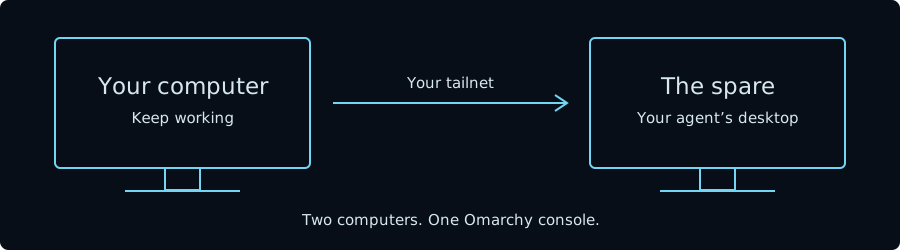
ibara gives your existing MCP agent the desktop of a physical computer you own. Install it on your own Omarchy computer and a spare, connect them over your Tailscale network, and let the agent work on the spare while you keep using yours. The spare keeps its browser profile, applications and files between tasks. You can watch and take control through the Omarchy console.
The software is free: there is no ibara subscription or rented-computer plan. The core and shell plugin are MIT licensed; the bundled stream and viewer forks are GPL-3.0. The starting hardware requirement is two x86_64 computers running Omarchy 4. The spare must be awake, signed in and unlocked. This is not a Windows or macOS desktop product.
Its strongest fit is an actual application task: check a UI, use a native editor, or inspect a file the agent produced. The published September 29 benchmark records 132 passes in 157 attempts on release 0.1.0-17, with failures retained. Those are internal results on two specified mini PCs, not a comparison against the other products here.
Best suited for: Omarchy users who already have a suitable spare and want agent work on separate physical hardware. Choose another route if you need other operating systems, rented capacity or quickly provisioned fleets of disposable environments.
Requirements · Access and data · Dated benchmark
2. Cua Spaces, best for sharing computers you bring
Cua Spaces connects people and agents to shared desktops on computers you supply. Its current quickstart starts with a Mac, a Windows PC in preview, or a Linux PC running Ubuntu 24.04. The first Space can be your existing desktop; additional Linux Spaces use a container engine, and additional macOS Spaces require Apple silicon. This makes it a broader shared-computer choice than an Omarchy-only application.
The free plan lists two live sessions and 20 remote hours per month. Pro is $18 per month when billed monthly, with five live sessions and 200 remote hours. Teams is $30 per seat per month on monthly billing, with pooled allowances. These are service allowances, not rented computers: you still supply the hardware or pay your own cloud provider.
That distinction matters for a team deciding who runs its environment. Cua supplies the sharing layer and relay; its pricing page says local or direct connections do not consume relay hours. Cua Driver and Lume are MIT licensed, while Spaces is source-available under FSL-1.1-MIT. Check the license for the component you intend to use rather than treating the whole stack as one license.
Best suited for: People and teams sharing supported computers, especially when macOS or team-managed access is part of the requirement. Compare the relay allowance with the number of simultaneous people and agents you expect to connect.
Cua Spaces quickstart · Cua pricing and licenses
3. Orgo, best for rented persistent cloud desktops
Orgo provides the computer instead of asking you to supply a spare. Its documentation describes a persistent cloud desktop with a browser, terminal and files, reachable through an HTTP API and VNC. The desktop can run an agent continuously and retain its state through stops and restarts. Choose this route when maintaining another physical computer is the part you want to avoid.
Its site lists plans starting at $29 per month and additional computers at $32.50 each. Linux is available on every plan; Windows is available on Scale or as an add-on. Mac and iPhone access are by request, so do not treat those as the same self-serve starting point. Confirm the selected plan and billing period on the current pricing page.
Developers can reach computers through REST, Python or TypeScript SDKs, a CLI, or MCP. Orgo is the environment rather than a requirement to adopt one particular model: its documentation describes connecting a model, installing an agent inside the computer, or running developer CLIs there. That gives you a different operating responsibility from buying a finished, single-purpose assistant. You still need to choose the agent, its permissions and the task’s completion checks.
Best suited for: Builders who need a persistent full desktop and prefer a hosted computer bill to owning the machine. It is also the more natural starting point when remote capacity matters more than keeping work on your own Omarchy hardware.
Orgo product and pricing · Orgo documentation
4. Browser Use, best for browser-only agent work
Browser Use is the relevant alternative when the entire task stays on websites. Its open-source Python library lets an agent operate a browser. The company also offers hosted agents and browser infrastructure. Those are related choices, but a free library and a hosted task are not the same purchase. Decide whether you want to run the agent yourself or send work to the hosted service.
The hosted pricing page lists browser time at $0.02 per hour, plus traffic. Hosted browser agents add a 20% fee on model usage as well as browser time and traffic. Residential proxy traffic is listed at $5 per GB; direct connections or your own proxy use a different traffic rate. A browser-hour headline is therefore not the full price of a completed task.
The library is MIT licensed. That makes it an option for developers who want to inspect or change the browser-agent loop without adopting a whole desktop product. The practical boundary is equally important: Browser Use is browser-only, so a task that must operate a native application needs another tool. Do not choose a complete desktop merely for a website job that this narrower environment can handle.
Best suited for: Developers automating web forms, research and other workflows that remain inside a browser. Choose between the library and cloud products by who should run the browser, and budget model and traffic usage alongside time.
Browser Use source · Cloud pricing · Documented browser-only scope
Side-by-Side Comparison
The same criteria apply to every row: environment, supplied hardware, entry price and connection. Prices are USD, checked 20 October 2026; paid monthly where a monthly plan is shown. These prices buy different things and are not a normalized task-cost benchmark.
| Tool | Environment / hardware | Published entry price | Agent connection |
|---|---|---|---|
| ibara | Full desktop; two owned Omarchy 4 x86_64 computers | Free software; no ibara subscription | Existing MCP agent |
| Cua Spaces | Shared desktops; bring supported computers or your cloud VMs | Free: 2 live sessions, 20 remote hours/month; Pro $18/month | MCP and SDKs |
| Orgo | Rented persistent cloud desktop | From $29/month; additional computers $32.50 each | REST, SDKs, CLI and MCP |
| Browser Use | Browser only; local library or cloud | MIT library; cloud $0.02/browser hour plus traffic; agents add model +20% | Library or hosted API |
Which computer-use tool fits your use case
| Your situation | Start with | Why | Check first |
|---|---|---|---|
| An Omarchy agent needs its own physical desktop | ibara | Separate owned computer, familiar console | Two suitable computers and tailnet access |
| A team shares existing Macs or supported PCs | Cua Spaces | Shared computers and team service options | OS support, licensing and relay allowance |
| You need a desktop but do not want to own the machine | Orgo | Hosted persistent computers | Required OS, monthly plan and agent setup |
| The whole workflow stays on websites | Browser Use | Browser-agent library or hosted service | Local versus cloud, model and traffic costs |
What results look like with ibara
These are internal measurements and task checks, not customer case studies or a head-to-head comparison.
157 attempts, including the failures
The September 29 release benchmark on two Celeron mini PCs recorded 132 of 157 attempts passed: 56 of 74 desktop attempts and 76 of 83 browser attempts. The published record identifies 13 ibara failures, eight agent failures and four benchmark-setup failures. Read the configuration, tasks and failure record before applying that result to a different setup.
A saved drawing, reopened and checked
In an October 20 internal task, an agent used Draft on Omarchy to make four lines forming a 12 × 8 model-foot outline, save and reopen the DXF, and export a 3 × 2-inch drawing on landscape Letter at 1:48. The test record includes its source revision and limits, including the unrecorded ibara build; this was not a physical-print test or a release benchmark.
For a quick look at the workflow, take over the on-site demo. Use the first-task guide for work on your own computer.
FAQ
What is the best computer-use tool for Omarchy?
For an Omarchy user with a spare, ibara is our first choice because it is built around that setup. That recommendation does not extend to Windows, macOS or a requirement for rented desktops.
How is a browser agent different from a desktop tool?
A browser agent works on web pages. A desktop tool can also reach native apps and the surrounding desktop, which matters when the task leaves the browser.
What computers do I need for ibara?
Start with your own computer and a spare, both running Omarchy 4 on x86_64 and connected through Tailscale. Check the requirements before installing.
How much does ibara cost?
ibara is free software with no ibara subscription or rented-computer plan. You supply the computers and the agent; optional paid setup help is available separately.
How do I keep control of an agent’s task?
Watch the spare in the ibara console and take control when you need to. Review the access and approval rules before giving the agent accounts or consequential work.
What happens to screenshots and model data?
The computer work happens on your hardware, but an agent may send screenshots or other task data to its model provider. Local desktop control does not establish local model processing.
How were the tools tested for this shortlist?
Competitor features and prices were checked against vendor sources; we did not run a shared head-to-head benchmark. The ibara results are separately dated internal measurements with their failures and limitations retained.
What should my first task be?
Start with generated or non-private data and a small result you can inspect. The first-task guide includes a practice task before work in a signed-in account.
Sources and review dates
Product sources were checked 20 October 2026. Review this page by 19 November 2026, or sooner if an offer or platform changes. Published and updated dates change only when the page is actually reviewed.
- Cua pricing and licenses and platform prerequisites.
- Orgo product and starting price and computer and connection documentation.
- Browser Use pricing, MIT library and scope.
- ibara requirements, access and data, benchmarks and test results.
Related decisions: Orgo vs Cua · Browserbase vs Browser Use · Real computers vs cloud.
Try ibara for free (no credit card required)
Put one suitable spare computer to work. Keep your everyday computer available while your agent uses its own desktop. Watch the task and step in when you need to. Start with a small result you can check. Read the requirements, then install ibara. If you want help connecting the computers, talk to Tyler about setup.
Your agent works there. You keep working here.
Install ibara